How to Automate SEO: A Practical Guide for Founders
Here's the short version: to automate SEO you break the work into a repeatable loop — keyword research, briefing, drafting, on-page optimization, publishing, and tracking — then hand the repetitive parts to tools or AI agents while you keep judgment calls for yourself. Done right, you go from spending a full day a week on SEO to spending an hour approving work that's already done.
Most founders don't have an SEO problem. They have a consistency problem. You know you should publish, you know keywords matter, but it never gets done between shipping features and answering support. Automation fixes the consistency, not the strategy. Let's break down exactly what to automate, what to keep manual, and how to wire it into one system.
What "automate SEO" actually means
SEO automation doesn't mean pointing a robot at Google and walking away. It means removing the manual, repetitive steps between "I have an idea" and "this article is live and tracked."
There are three levels of SEO automation, and knowing which one you're doing keeps expectations honest:
- Task automation — a single step runs itself: pulling keyword volumes, generating a meta description, checking for broken links. Useful but still leaves you stitching steps together by hand.
- Workflow automation — several steps connect into a chain: research feeds a brief, the brief feeds a draft, the draft gets optimized. Less copy-pasting between tools.
- Agent automation — AI agents run the whole loop and coordinate with each other, so research, writing, and optimization happen as one continuous process with you approving the output.
Most tools sell you level one and call it a revolution. The leverage lives at levels two and three, where the handoffs between steps disappear.
Which SEO tasks are safe to automate
The rule is simple: automate anything repetitive and rules-based, keep anything that needs taste or a factual claim you'd stake your reputation on.
Good candidates for automation:
- Keyword research and clustering — pulling search volume, difficulty, and related terms, then grouping them into topics. This is data work, and machines are faster at it. Our keyword research guide walks through the manual version so you know what the automation is doing.
- Content briefs — turning a target keyword into an outline with headings, questions to answer, and internal links to include.
- First drafts — getting words on the page against a brief. AI drafts fast; a human still needs to check claims and voice.
- On-page optimization — title tags, meta descriptions, heading structure, internal linking, image alt text.
- Rank tracking and reporting — watching positions, clicks, and impressions so you know what's working without opening five dashboards.
- Technical monitoring — flagging broken links, slow pages, and missing meta tags on a schedule.
Keep these human, or at least human-approved:
- Final approval on every published page — automation drafts, you decide what ships.
- Original data, opinions, and product claims — the things that make content actually worth reading and can't be scraped from page one.
- Strategy — which topics matter to your business and in what order. That's yours.
Pro tip: the fastest way to lose trust with automated SEO is publishing unreviewed AI content at volume. Search engines and readers both notice. Automate the drafting, never the judgment.
How to automate SEO in six steps
Here's the loop to build. Each step feeds the next, which is what turns a pile of tools into an actual system.
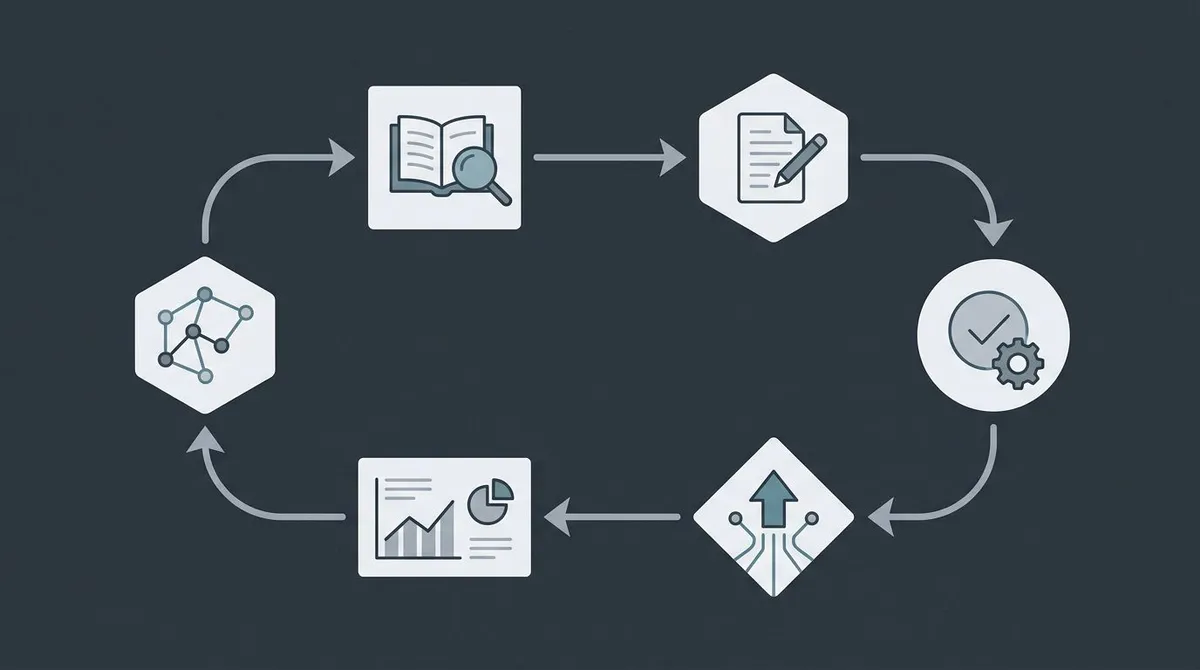
Step 1: Automate keyword research
Start by feeding a tool your seed topics and letting it expand them into a keyword list with volume, difficulty, and intent. Then cluster those keywords into topics — one topic per planned article. This is the foundation; if you get the content strategy and target terms wrong, automating everything downstream just produces the wrong articles faster.

Aim for a backlog, not a single keyword. A month of topics decided in one sitting beats deciding weekly.
Step 2: Automate briefs
For each target keyword, generate a brief: the H1, an H2 outline, questions real searchers ask, and the internal links to weave in. A good brief is what keeps an AI draft on-topic instead of generic. This is also where you bake in SEO best practices so every draft starts optimized instead of getting fixed later.
Step 3: Automate the first draft
Point your writing tool at the brief and let it produce a draft. Set the brand voice once so drafts sound like you, not like every other AI blog. Treat the output as a strong starting point — you're editing, not writing from scratch, which is where the time savings come from.
Step 4: Automate on-page optimization
Run the draft through on-page checks: is the target keyword in the title, first paragraph, and a heading? Are internal links present? Is the meta description under 155 characters? Are headings in a logical order? Much of this is rules-based and ideal for automation. For the bigger picture on ranking factors, see how to rank on Google.
Step 5: Automate publishing
Connect your draft to wherever it goes live. If you plan in Notion, the ideal is drafting and approving there, then publishing without a copy-paste round trip. The fewer manual handoffs between "approved" and "live," the more consistently you'll actually ship.
Step 6: Automate tracking
Once a page is live, track its position and traffic automatically and surface the next action — a page slipping from position 8 to 12 is a signal to refresh it. Reporting that requires you to remember to check it isn't automation. It should come to you.
Automate SEO with tools vs. with AI agents
There are two ways to build the loop above, and the difference matters more than most comparison posts admit.
The tool stack approach means buying a best-in-class tool for each step and connecting them yourself — a keyword tool, a writer, an optimizer, a rank tracker. It's flexible and you own every piece. The catch is that you become the integration layer, moving data between tools and remembering to run each step. That coordination is the actual work, and it doesn't scale past a few articles a month.
The AI agent approach means the steps run as one automated workflow, each stage handing off to the next, so the loop runs as a single process instead of a pile of manual triggers. You trade some per-tool flexibility for far less glue work. This is the direction the category is heading — we go deeper on it in how AI agents automate marketing.
Here's an honest comparison of common approaches:| Approach | Best for | Automation level | Human control | Coordination work |
|---|---|---|---|---|
| Lunroo | Founders who want the whole loop run for them | Agent (research → draft → optimize → publish) | Draft-and-approve on every page | Handled by the workflow |
| Point tools (Surfer, Frase) | Optimizing individual drafts you write | Task-level optimization | Full, manual | You stitch steps together |
| AI writers (Jasper, Copy.ai) | Fast drafting from prompts | Task-level drafting | Full, manual | You drive each prompt |
| SEO autopilots (Outrank, SEObot) | Hands-off bulk article publishing | Workflow (keyword → article) | Lighter; often auto-publish | Mostly handled |
| DIY scripts + APIs | Engineers who want total control | Whatever you build | Full | All of it is yours |
None of these is wrong. Surfer and Frase are genuinely good at on-page optimization. Outrank does a real job turning keywords into published articles. Where an end-to-end workflow like Lunroo differs is scope and control: it runs content, SEO, and analytics as one coordinated loop, keeps a draft-and-approve step so nothing ships without your sign-off, and lives in the Notion workspace you already plan in. If you're weighing a specific tool, we also cover the SurferSEO alternative angle in more depth.
How much SEO should you automate?
Automate the volume, keep the judgment. That's the balance that keeps automated SEO from turning into content sludge.
A healthy split for most founders looks like this:
- Fully automated: keyword data, clustering, briefs, rank tracking, technical monitoring. No reason to touch these by hand.
- Automated then approved: drafts and on-page optimization. The machine does 80%; you do the 20% that involves claims, voice, and taste.
- Always manual: strategy, original insight, and the final publish button.
The goal isn't zero human effort. It's spending your limited time on the parts only you can do — deciding what matters and vouching for what ships — while the repetitive middle runs itself. That's also the difference between content automation done well and publishing filler nobody reads.
If you'd rather not build and babysit the stack yourself, that's exactly the coordination an automated pipeline handles — you can start with Lunroo and keep the approval step, or see current pricing first. For a broader tooling survey, our roundup of the best AI SEO tools compares options across every step of the loop.
A realistic starting point this week
You don't need the full system on day one. Automate one step, prove it saves time, then add the next.
- This week: automate keyword research and build a 10-topic backlog.
- Next week: add automated briefs so each topic has an outline before you write.
- Week three: add a drafting tool with your brand voice set, and start approving instead of writing cold.
- Ongoing: turn on rank tracking so the system tells you what to refresh.
For the wider context on why this matters for early-stage companies specifically, SEO for startups covers where automated SEO fits in a founder's week. The compounding part is real: an automated loop that publishes consistently beats a manual one that stalls every time you get busy.
One good external reference as you build: Google Search Central documents what actually influences rankings, so you can point your automation at real best practices instead of SEO folklore.

FAQ
Can you fully automate SEO?
You can automate most of the repetitive work — keyword research, briefs, drafts, on-page optimization, and tracking — but you shouldn't fully remove the human. The judgment calls (strategy, factual claims, final approval) are what keep automated content trustworthy and worth reading. Aim for a system that does the volume and hands you the decisions, not one that publishes unreviewed.
What SEO tasks should stay manual?
Keep three things human: choosing which topics matter to your business, adding original insight or data that can't be scraped from page one, and approving every page before it goes live. Everything else — data pulling, outlining, first drafts, meta tags, rank tracking — is fair game for automation.
Does automated SEO content get penalized by Google?
Google penalizes unhelpful, low-quality content regardless of how it's made — automation isn't the problem, low quality is. AI-assisted content that's reviewed, accurate, and genuinely useful is fine. The risk comes from publishing raw AI output at volume with no human check, which tends to be thin and repetitive. Keep a human approval step and you stay on the right side of this.
What's the difference between SEO tools and AI SEO agents?
SEO tools automate individual tasks — a rank tracker tracks ranks, an optimizer scores a draft — and you connect them and run each step yourself. AI SEO agents run the steps as a coordinated loop and hand off to each other, so research feeds drafting feeds optimization without you moving data between tools. Tools give you flexibility; agents remove the coordination work.
How do I start automating SEO with a small budget?
Start with one step, not a full stack. Automate keyword research first, since it drives everything else, then add briefs and a drafting tool as you prove the time savings. You can assemble point tools, or use a single agent platform that covers the whole loop — compare the total cost against a copywriter plus an SEO retainer plus a stack of separate tools, and see current pricing to weigh it.
How long until automated SEO shows results?
SEO is slow whether you automate it or not — expect three to six months before new content ranks and drives meaningful traffic. What automation changes is consistency: you publish steadily instead of in bursts, which is what makes SEO compound. The work gets easier immediately; the traffic follows on Google's timeline, not yours.